
Product updates · November 12, 2026 · 3 min read
DaVinci Market's new (and improved) Help Centre
We rebuilt the Help Centre from scratch: new guides, better search, a new sidebar, and 28 improved articles.
In this article
The old Help Centre did its job. But answers were split across three separate guide pages, some articles were a few paragraphs of plain text, and finding the right one meant already knowing what it was called. So we rebuilt it.
Improvements
One Help Centre. Buyers, creators, accounts and privacy, all in one place.
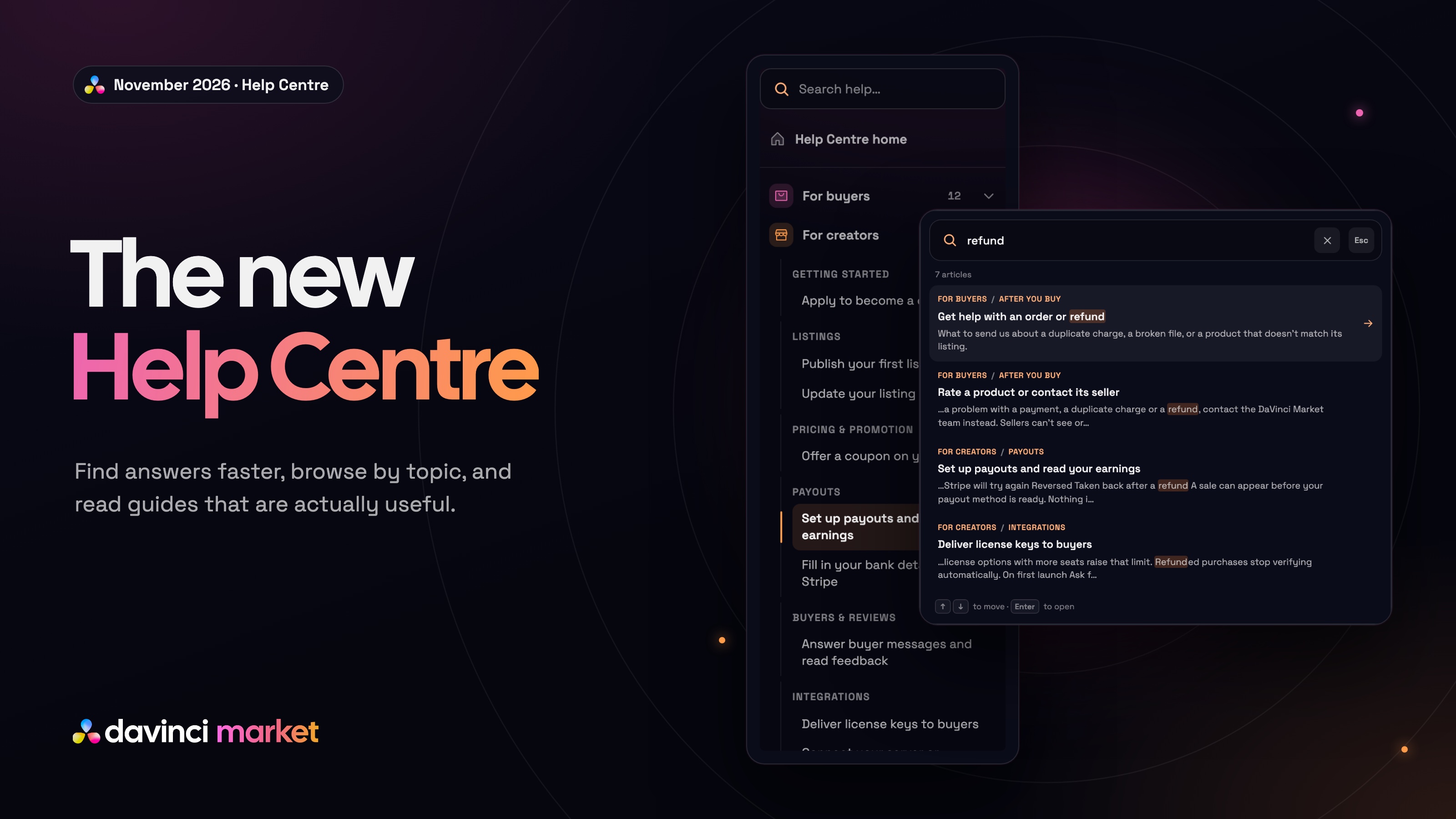
Search that shows its work. Results as you type, with the sentence that matched.
A sidebar you can find your way around. Every topic and article, grouped and collapsible.
Every article rewritten. 28 in total, seven of them new.
Better on your phone. A tidy menu, and tables that don't scroll sideways.
Everything in one place

There's no separate Buyer Guide or Creator Guide anymore. Everything sits in one Help Centre, split into four areas: For buyers, For creators, Account, and Privacy & safety. Old links still work and take you to the right section.
The home page starts with the search bar, then a row of the questions we get asked most, then the four categories. Open a category and you'll see all its articles at once, with filters for each topic, like Payouts or Downloads & installing.
Search that shows its work

Type a word or two and results appear as you go. Titles and tags count most, and when the match is further down an article you'll see the sentence it came from, so you can tell straight away whether it's the one you want. The arrow keys and Enter work too.
A sidebar you can find your way around

On the left, every topic and article, grouped so you can open just the part you need. It keeps your place as you move between articles. On the right, On this page follows along as you scroll, which makes the longer guides much easier to jump around in.
Articles worth reading
We rewrote all 28 articles and checked each one against how the site works today, not how it worked when the article was first written. They're built from steps, tables, tips and questions you can expand, instead of walls of text. A few that are new:
Install plugins, macros, scripts and PowerGrades: where each kind of tool goes in Resolve, and how to find it afterwards.
Prices and currencies: why a price can show “≈”, and what you're actually charged.
Your data and who can see it: what we keep, what sellers see, and how to ask for a copy.
Stay safe from scams and fake messages: what we'll never ask you for.
Creators get the most changes: publishing your first listing, payouts, coupons, license keys and webhooks are all rewritten, and the technical guides now include code you can copy in one click. Start with For creators.
Just as easy on your phone

On a phone, the sidebar folds into a bar at the top that opens a menu, and wide tables turn into cards that are easy to read without scrolling sideways.
Tell us what's missing
If you come looking for an answer and don't find it, we want to know. Use Contact us at the end of any article and tell us what you were trying to do, or what the article was missing.